How to Navigate Infodeck
Learn the Infodeck interface to quickly access all features and manage your facilities efficiently.
Quick Summary
Use the left sidebar for main features, the Settings gear for configuration, and the profile icon for personal settings.
Interface Overview
The Infodeck interface has three main areas:
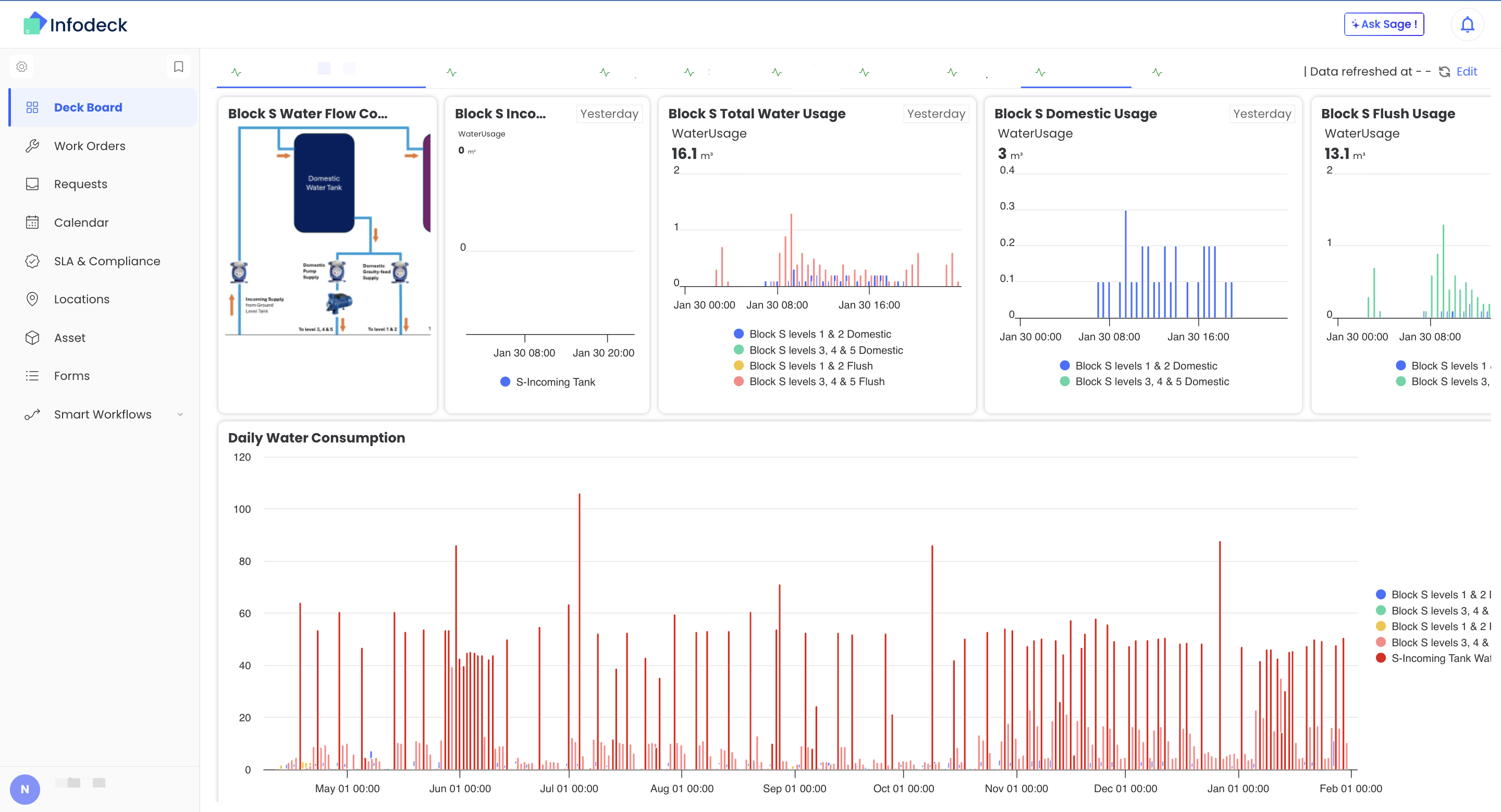
Left Sidebar: Main Navigation
The sidebar provides quick access to all core features:
| Icon | Label | What It Does |
|---|---|---|
| Deck Board | View dashboards with widgets and charts | |
| Work Orders | Create and manage maintenance tasks | |
| Requests | Handle incoming work requests | |
| Calendar | View work orders in calendar format | |
| SLA & Compliance | Monitor SLA performance and metrics | |
| Locations | Manage buildings, floors, and rooms | |
| Asset | Track equipment and IoT devices | |
| Forms | Create and manage digital forms | |
| Smart Workflows | Set up automated rules |
Click Behavior
| Action | Result |
|---|---|
| Click menu item | Opens the main list view |
| Click expand arrow | Shows sub-menu options |
Settings Gear Menu
Click the Settings gear icon at the bottom of the sidebar to access configuration:
| Menu Item | What It Does |
|---|---|
| Asset Type | Create and manage asset categories |
| IoT Management | Monitor IoT device status and data |
| Integrations | Connect external systems (LoRaWAN, APIs) |
| Export Data | Download data for reports |
| Company Profile | Update organization settings |
| Organization Security | Configure security policies |
| API Keys | Manage API access tokens |
| Teams / Members | Invite users and create teams |
| Usage & Analytics | View usage statistics |
| Subscription and Billing | Manage your plan |
Top Navigation Bar
The top bar contains global actions:
| Element | Location | Purpose |
|---|---|---|
| Search | Center | Find work orders, assets, locations |
| Profile Icon | Right | Personal settings, logout |
| Notifications | Right | View alerts and updates |
Profile Menu
Click your profile icon to access:
| Option | Description |
|---|---|
| My Profile | View and edit your information |
| Notification Preferences | Configure alert settings |
| Language | Change interface language |
| Sign Out | Log out of Infodeck |
Common Navigation Patterns
Opening a List View
- Click the feature in the sidebar (e.g., Work Orders)
- See the list of all items
- Use filters and search to find specific items
- Click any row to open details
Creating New Items
Most features have a Create button:
- Open the feature (e.g., Asset)
- Click the Create [Item] button (top right)
- Fill in the form
- Click Create to save
Detail Views
When you open an item, you see:
| Section | Content |
|---|---|
| Header | Name, status, key info |
| Tabs | Different views (Profile, Status, History) |
| Actions | Edit, Delete, Status changes |
| Related Items | Linked assets, work orders, forms |
Keyboard Shortcuts
Navigate faster with keyboard shortcuts:
| Shortcut | Action |
|---|---|
/ | Open search |
Esc | Close modal/dialog |
Enter | Submit form |
Tab | Move to next field |
Finding Things
Global Search
- Click the search bar (or press
/) - Type what you're looking for
- Results appear as you type
- Click a result to open it
Search finds:
- Work orders (by title, number)
- Assets (by name, UUID)
- Locations (by name)
- Users (by name, email)
Filtering Lists
Most list views have filters:
| Filter Type | Example |
|---|---|
| Status | Open, In Progress, Complete |
| Priority | Low, Medium, High, Urgent |
| Date Range | This week, Last month, Custom |
| Assigned To | Specific user or team |
| Location | Specific building or zone |
Page Layouts
List View
┌─────────────────────────────────────────────────────────┐
│ [Title]                           [Search] [+ Create]   │
├─────────────────────────────────────────────────────────┤
│ Filters: [Status ▼] [Priority ▼] [Date ▼] [Location ▼]  │
├─────────────────────────────────────────────────────────┤
│ ☑ Item 1        Status    Priority    Due Date          │
│ ☑ Item 2        Status    Priority    Due Date          │
│ ☑ Item 3        Status    Priority    Due Date          │
├─────────────────────────────────────────────────────────┤
│ ◀ 1 2 3 4 5 ▶                       Showing 1-25 of 100 │
└─────────────────────────────────────────────────────────┘
Detail View
┌─────────────────────────────────────────────────────────┐
│ [← Back]  Item Name                    [Edit] [Delete]  │
├─────────────────────────────────────────────────────────┤
│ [Profile] [Status] [History] [Files]                    │
├─────────────────────────────────────────────────────────┤
│                                                         │
│ Content changes based on selected tab                   │
│                                                         │
└─────────────────────────────────────────────────────────┘
Dashboard View
┌─────────────────────────────────────────────────────────┐
│ [Deck 1] [Deck 2] [Deck 3]              [Edit] [+New]   │
├─────────────────────────────────────────────────────────┤
│ ┌───────────┐ ┌───────────┐ ┌───────────────────────┐   │
│ │  Widget   │ │  Widget   │ │        Widget         │   │
│ │    1      │ │    2      │ │          3            │   │
│ └───────────┘ └───────────┘ └───────────────────────┘   │
│ ┌───────────────────────────┐ ┌───────────────────┐     │
│ │         Widget            │ │      Widget       │     │
│ │           4               │ │        5          │     │
│ └───────────────────────────┘ └───────────────────┘     │
└─────────────────────────────────────────────────────────┘
Common Actions by Feature
Work Orders
| Action | How |
|---|---|
| Create new | Work Orders → Create Work Order |
| Assign | Open work order → Assign To field |
| Change status | Open work order → Update Status button |
| Add comment | Open work order → Comments section |
Assets
| Action | How |
|---|---|
| Register new | Asset → Create Asset |
| View history | Open asset → History tab |
| Link to location | Open asset → Location field |
Locations
| Action | How |
|---|---|
| Add building | Locations → Create Location |
| Add floor | Select building → Create SubLocation |
| Add room | Select floor → Create Zone |
Forms
| Action | How |
|---|---|
| Create form | Forms → Create Form |
| View responses | Open form → Responses tab |
| Assign to location | Open form → Form Associate tab |
Tips for Navigation
Use Breadcrumbs
When viewing details, breadcrumbs show your path:
Home > Locations > Building A > Floor 1 > Server Room
Click any part to go back to that level.
Pin Favorite Dashboards
Set frequently used dashboards to appear first by adjusting their weight setting.
Bookmark Common Pages
Use browser bookmarks for pages you access daily:
- Your team's work order list
- Key dashboards
- Frequently edited forms
Related Articles
Need help? Contact Infodeck Support